The DTF Gangsheet Builder is a game-changing tool for anyone passionate about DTF printing. This innovative software allows users to create gang sheets, optimizing the printing process by efficiently arranging multiple designs on one sheet. For beginners, mastering the DTF Gangsheet Builder is not just advantageous but essential for minimizing costs and maximizing creativity. By utilizing this powerful resource, users can achieve stunning results with vibrant colors and intricate designs, elevating their custom apparel projects. Join us as we explore expert tips and tricks to enhance your skills and streamline your workflow with gang sheets.
Innovative solutions are continuously emerging within the custom apparel printing sphere, with tools like the DTF gang sheet creator leading the charge. Commonly referred to as Direct to Film or DTF, this printing technique enables users to transfer detailed images onto various fabrics through meticulously designed film sheets. Simplifying the printing workflow, this method allows novices to effectively manage their designs and achieve professional-grade outputs. Discover how utilizing a gang sheet can not only save resources but also inspire creativity by offering diverse combinations of designs that cater to various customer demands. In this guide, we’ll delve into valuable strategies for beginners looking to harness the power of DTF technology.
Maximizing Your DTF Printing Efficiency with Gang Sheets
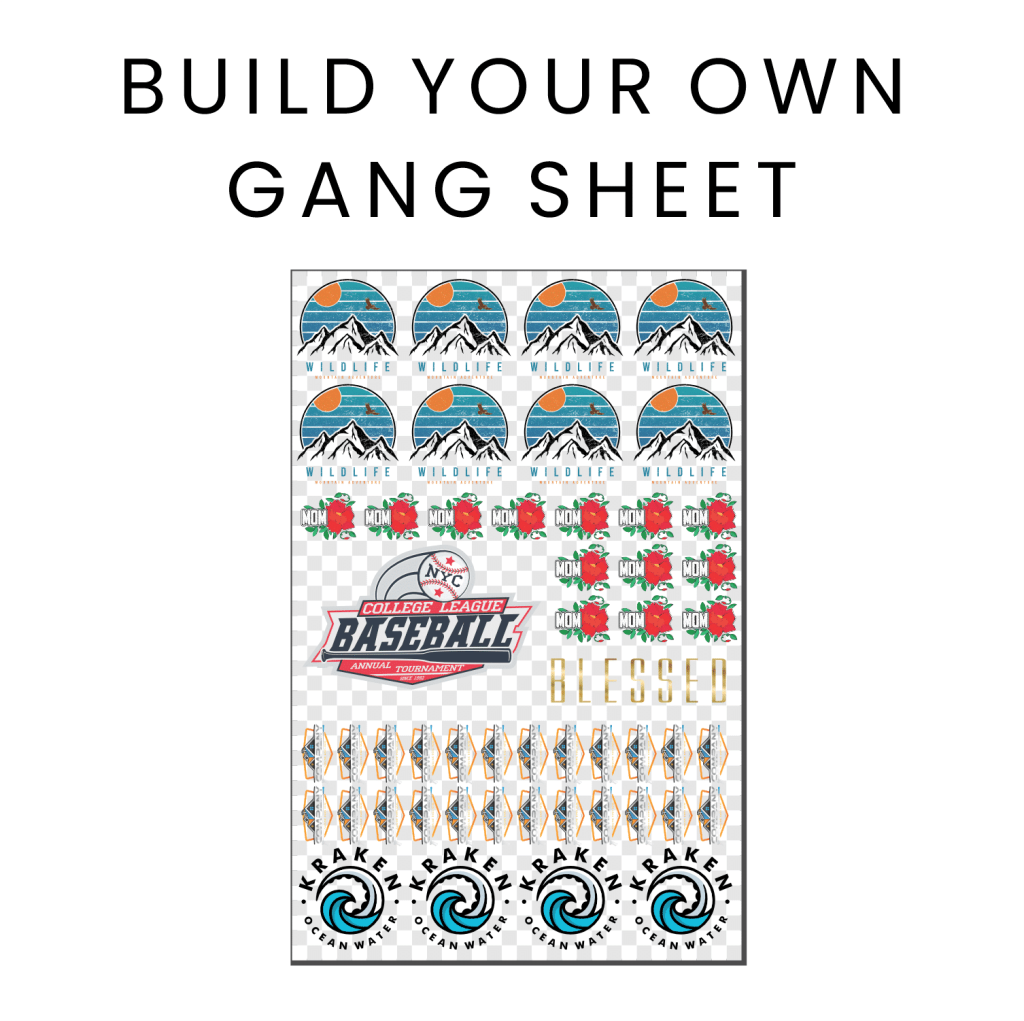
In the realm of DTF printing, utilizing gang sheets is a game changer for maximizing efficiency. By compiling various designs on a single sheet, printers can significantly reduce material waste, making each print run considerably more cost-effective. The gang sheet not only saves ink and film but also streamlines the workflow. When beginners understand and embrace the concept of gang sheets in their printing process, they can operate with both speed and precision, adapting to customer needs without compromising on quality.
Moreover, using a DTF gangsheet builder allows for a more dynamic approach to custom design. For start-ups and small businesses, the ability to adjust to varying customer demands quickly while maintaining a consistent output of high-quality prints on diverse fabrics is invaluable. Efficient gang sheet layouts enable beginners to experiment with multiple motifs or style variations without incurring hefty costs.
Key Materials for Successful DTF Printing
The foundation of any successful DTF printing project begins with the right materials. High-quality inks specifically formulated for DTF transfers ensure vivid colors that adhere well to fabrics. Additionally, choosing durable DTF transfer films designed to withstand heat and pressure is crucial in achieving a successful image transfer. Beginners should avoid cutting corners when selecting these materials, as the quality of inks and films directly influences the final product’s look and longevity.
Equally important is understanding the types of fabrics suitable for DTF printing. Each fabric has unique characteristics that dictate how well the ink adheres and how vibrant the colors appear. Knowing the differences between cotton, polyester, and blends can help beginners assess which materials will yield the best results for their specific designs. Conducting tests on various fabrics is essential for finding those that perform well under heat transfer conditions.
Design Preparation Techniques for Beginners
Preparation is key to successful DTF printing, especially when it comes to design resolution and the software used. To ensure crisp, professional results, designs should be created in high resolution—ideally at 300 DPI—to avoid pixelation. This attention to detail not only enhances the clarity of prints but also contributes to overall customer satisfaction with the final product.
Choosing the right software also plays a significant role in preparing designs for DTF printing. Programs like Adobe Illustrator and CorelDRAW are excellent options for creating complex and detailed designs suitable for DTF applications. Additionally, these platforms support file formats like PNG and TIFF, which are essential for optimal image quality during the printing process. For beginners, understanding these design tools can enhance their ability to create stand-out prints.
Efficient Gangsheet Layout Strategies
Creating an effective gangsheet layout is crucial for optimizing the use of space and minimizing waste. Beginners should learn to arrange designs as closely as possible without risking overlap, which can lead to inaccuracies during cutting and transferring. Strategic placement of designs not only maximizes the number of prints per sheet but also enhances the workflow by reducing the time spent on adjustments.
Furthermore, incorporating different design sizes strategically can fill gaps and ensure that every part of the sheet is utilized efficiently. This layout strategy not only makes economic sense but also allows for a diverse range of prints to be produced within a single run, catering to a wider array of customer requests.
Mastering Printer Settings for DTF
To achieve the best results in DTF printing, mastering printer settings is crucial. Adjusting ink density can significantly impact color saturation, ensuring that designs appear vibrant and true to the original artwork. Beginners must familiarize themselves with their printer’s settings, as these adjustments can make the difference between a mediocre print and a strikingly vivid design.
Additionally, understanding the appropriate temperature and pressure settings for transferring films onto fabric is vital. Conducting test prints before full production allows beginners to refine these specifications, ensuring that each print not only looks great but also adheres properly, providing a durable final product. This step fosters confidence in the printing process and minimizes errors that could lead to wasted time and materials.
Curing and Application Techniques for Long-Lasting Prints
Once printing is complete, proper curing is essential for ensuring that DTF transfers adhere well to fabric and withstand washing. Utilizing a heat press set within the recommended temperature range of 320°F to 350°F for about 10-15 seconds is standard practice. Beginners should be meticulous about applying even pressure across the transfer film to prevent imperfections, ensuring that every detail of the design is accurately reproduced.
Educating customers on post-print care is equally important to maintain the integrity of DTF prints. Advising them to wash printed garments inside-out and in cold water can significantly extend the life of the design. Encouraging practices such as avoiding bleach and fabric softeners also protects against fading and degradation, ensuring that customers enjoy their custom prints for years to come.
Frequently Asked Questions
What is a DTF Gangsheet Builder and how does it work?
A DTF Gangsheet Builder is a tool that allows users to arrange multiple designs on a single sheet of DTF transfer film for printing. This method enhances efficiency and reduces costs by maximizing material usage and cutting down on the number of prints required.
What are the benefits of using gang sheets for DTF printing?
Utilizing gang sheets in DTF printing offers multiple advantages including cost-effectiveness, increased printing efficiency by combining designs, and the ability to create versatile print combinations to meet various customer demands in one go.
What materials should I choose for DTF printing with a gangsheet builder?
For optimal results in DTF printing, select high-quality DTF inks and transfer films that adhere well, along with appropriate fabrics like cotton or polyester. Quality materials are essential for achieving vibrant colors and durable prints.
How should I prepare my designs for effective use of a DTF Gangsheet Builder?
When preparing designs for a DTF Gangsheet Builder, ensure they are created at a minimum resolution of 300 DPI for sharp prints. Additionally, utilize design software that supports DTF-compatible formats such as PNG or TIFF.
What printer settings are important for successful DTF printing with gang sheets?
Key printer settings for DTF printing include adjusting ink density for deep color saturation, and carefully setting temperature and pressure based on the transfer film and fabric types. Conducting test prints can help in perfecting these settings.
What are some post-printing care tips for DTF transfers on gang sheets?
To maintain the vibrancy and durability of DTF transfers, advise customers to wash garments inside-out in cold water, avoid using bleach and fabric softeners, and follow proper drying techniques to prevent damage to the prints.
| Key Points | Description |
|---|---|
| Understanding DTF Printing | DTF printing allows detailed graphics to be printed on films and transferred to fabrics, ideal for custom apparel. |
| Benefits of Using Gang Sheets | Cost-effective, efficient, and versatile design options. |
| Choosing the Right DTF Materials | High-quality inks, films, and understanding fabric compatibility are crucial. |
| Design Preparation for Gang Sheets | Focus on high resolution (300 DPI) and use appropriate design software. |
| Effective Gangsheet Layout | Optimize space and align designs correctly to minimize waste. |
| Mastering the Printing Process | Adjust printer settings and conduct test prints for accuracy. |
| Curing and Application Techniques | Use appropriate temperature and pressure during application. |
| Post-Printing Care | Educate on washing techniques to maintain print durability. |
Summary
The DTF Gangsheet Builder is a powerful tool that not only simplifies the printing process but also amplifies your capabilities as a printer. By applying the insights gained from this guide on design preparation, material selection, and printing techniques, you can optimize your DTF printing workflow and produce stunning apparel designs that cater to diverse customer demands. Engaging in practice and seeking feedback from the printing community will further refine your skills, ensuring that your journey in DTF printing is both rewarding and successful. Embrace the potential of the DTF Gangsheet Builder, and elevate your printing projects to new heights.