
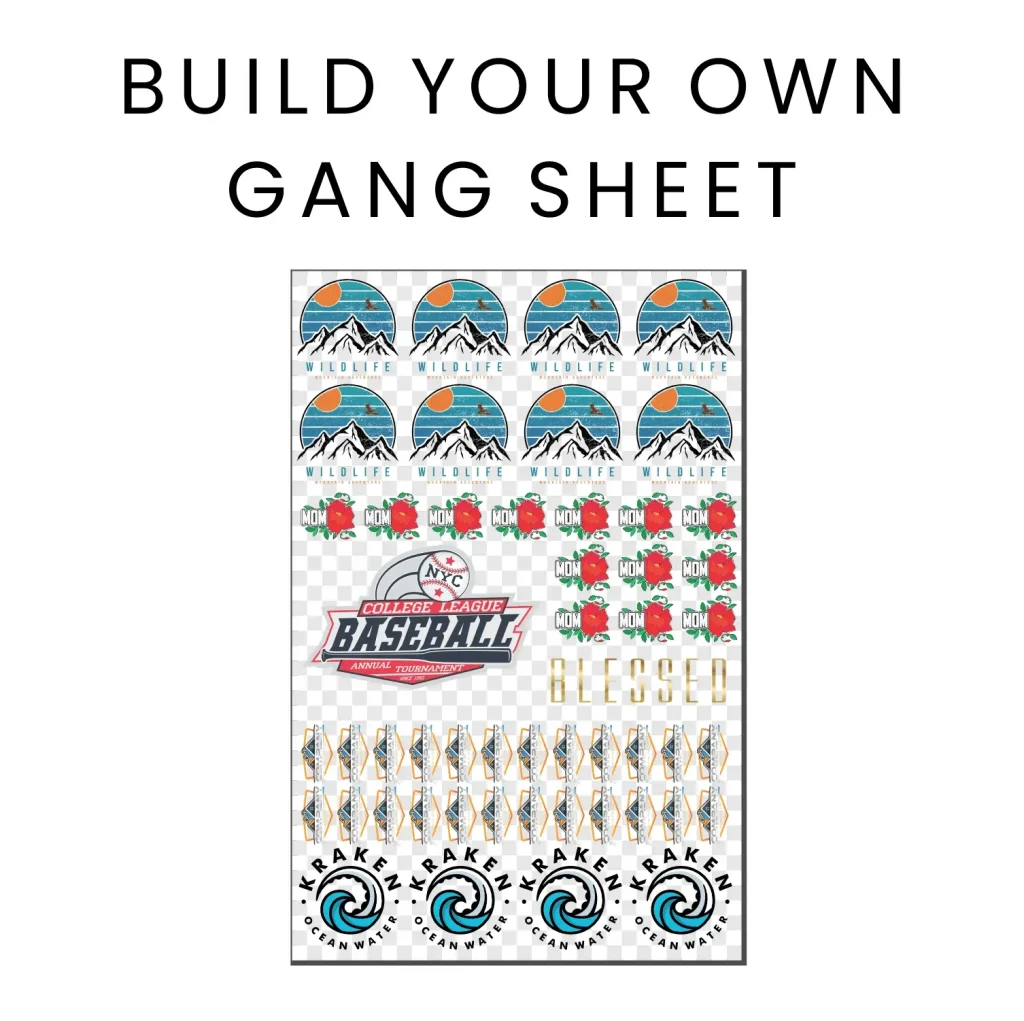
If you’re venturing into the world of textile printing, mastering the **DTF Gangsheet Builder** can elevate your design output significantly. This innovative tool is essential for anyone engaged in Direct to Film (DTF) printing, as it allows multiple designs to be efficiently printed on a single gang sheet, saving both time and material costs. With the rise in popularity of gangsheet printing, understanding how to optimize your designs will greatly enhance your production capabilities. In this comprehensive guide, we will explore vital print design tips that not only make the most of your high-quality DTF film but also streamline your workflow. Whether you are a novice or an experienced printer, this guide serves as your roadmap to mastering essential textile printing techniques.
Exploring the DTF Gangsheet Builder opens up a realm of possibilities in the textile printing landscape. This advanced tool facilitates the application of direct-to-film technology, enabling users to combine various graphic designs into one coherent sheet efficiently. The process, often referred to as gangsheet printing, not only enhances production efficiency but also optimizes the use of high-quality ink and film materials. Learning the nuances of this technique prepares you to navigate the diverse world of print design while leveraging effective textile printing methods. Dive into our guide to uncover essential strategies that will guide you through the intricacies of DTF printing and help you turn your creative ideas into reality.
An Overview of DTF Printing Techniques
DTF printing, short for Direct to Film printing, is revolutionizing the textile printing landscape. This method allows for intricate designs to be transferred onto various fabric types with remarkable precision and vibrancy. Unlike traditional printing techniques that may require extensive setup and multiple supplies, DTF simplifies the process by only needing high-quality DTF film and inks to produce stunning designs. Since the ink bonds to the film material, it enhances the durability of prints, ensuring they withstand both wear and washing without fading.
One of the significant advantages of DTF printing is its versatility. Whether you’re working with cotton, blends, or even more synthetic fabrics, DTF printing can accommodate almost any material. This adaptability makes it a preferred choice for custom apparel businesses looking to offer a broad range of products. With the proper use of pigment inks and a controlled application process, designers can achieve complex patterns, gradients, and color-rich outputs that resonate well with consumers.
Maximizing Output with the DTF Gangsheet Builder
The DTF Gangsheet Builder is an essential tool for anyone serious about maximizing efficiency in their printing operations. This technique allows multiple designs to be printed simultaneously on a single sheet, thus optimizing both time and resources. By utilizing gang sheet printing, you can significantly reduce film usage, lower costs, and decrease the setup time for printing jobs, making it particularly appealing for small businesses or individuals just entering the market.
To effectively use the DTF Gangsheet Builder, designers need to focus on layout planning. Arranging your designs carefully ensures that there is minimal wasted space on the film, allowing for maximal output from each print run. Additionally, understanding how to manipulate the designs to fit within the boundaries of the gang sheet will significantly impact the final printing quality. With these strategies in place, you’ll harness the full potential of gang sheet printing, leading to better business efficiency and higher customer satisfaction.
Choosing the Right Materials for DTF Printing
The choice of materials in DTF printing is vital to achieving high-quality prints that meet professional standards. Using high-quality DTF films specifically designed for this purpose is essential, as they ensure proper adhesion of inks. Films with a specially treated surface allow for better ink transfer under heat, which directly impacts the vibrancy and durability of the final product. Moreover, selecting appropriate transfer papers that correspond with printer specifications will result in clearer, sharper prints with minimal errors.
Beyond DTF film, the type of fabric also plays a crucial role in the printing process. The right fabric can enhance the aesthetic of the print and its overall longevity. Natural fibers like cotton will typically absorb inks differently than synthetic materials; hence, understanding these differences is important. Test different combinations to identify the best possible outcomes for your projects, ensuring you achieve the desired quality and texture that your clients expect.
Advanced Design Preparation Techniques
In the world of DTF printing, proper design preparation is key to producing prints that stand out. Utilizing advanced graphic design software like Adobe Illustrator or CorelDRAW allows beginners and professionals alike to create designs that are not only vibrant but also suitable for the DTF medium. Properly formatting files to the specific requirements of DTF printing, such as DPI settings and color modes, is crucial in ensuring that designs maintain their quality throughout the printing process.
Appearance can significantly be enhanced by manipulating design elements like color gradients and layering. Since DTF printing can reproduce fine details with high accuracy, artists are encouraged to experiment with intricate designs that utilize the full range of colors. This advanced approach to design preparation can elevate the final product and create eye-catching results that draw in customers and distinguish a brand within the competitive textile market.
Essential Tips for Printer Settings Adjustments
Optimizing printer settings is critical for achieving vivid and consistent colors in DTF printing. Key adjustments such as ink density and print speed greatly influence the output quality. For beginners, starting with recommended manufacturer settings is advisable before slowly altering them to match the specific needs of your prints. Understanding how variations in these settings can affect ink distribution on the film will help in fine-tuning your results.
Furthermore, working in the correct color mode, ideally CMYK, ensures an accurate color representation on the final fabric. Each color channel in CMYK affects the outcome of the printed design, so familiarity with these settings and experimenting with them can lead to significant improvements in print quality. Investing time in mastering printer settings not only enhances the immediate print output but also contributes to long-term consistency and reliability in production.
Post-Production Care for DTF Transfers
Post-production techniques play a significant role in the longevity of DTF prints. After heat transfers, allowing the design to cool adequately before peeling it off ensures that the transfer adheres properly to the fabric, minimizing any risks of wear or tearing. This careful handling is important in preserving the print’s vibrancy and preventing common issues like peeling or cracking.
Conducting wash tests on sample prints is also essential for verifying the durability and color retention of your designs. Different fabrics react uniquely to washing, so testing can help to set realistic expectations for product performance. Proper post-production care not only safeguards your investment in quality materials and printing techniques but also enhances customer satisfaction, ensuring they return for more orders.
Frequently Asked Questions
What is the DTF Gangsheet Builder and how does it work?
The **DTF Gangsheet Builder** is a tool designed for **DTF printing**, which allows users to arrange multiple designs on a single sheet of film. This method, known as gang sheet printing, optimizes both time and resources, enabling you to produce many custom prints simultaneously while minimizing waste.
How can I ensure high-quality results with DTF Gangsheet printing?
To achieve high-quality results with **DTF Gangsheet printing**, it’s crucial to use high-quality DTF film and inks. Additionally, setting your designs at 300 DPI in graphic design software and correctly adjusting printer settings, such as ink density and print speed, will help ensure vibrant prints with excellent clarity.
What materials do I need for using the DTF Gangsheet Builder effectively?
To effectively use the **DTF Gangsheet Builder**, you need specialized **high-quality DTF films**, suitable transfer papers, as well as **DTF printing inks**. Ensuring that all materials are compatible with your specific printer will greatly enhance your printing quality.
What are some design tips for using the DTF Gangsheet Builder?
When designing for the **DTF Gangsheet Builder**, utilize graphic design software like Adobe Illustrator to prepare your artwork. Remember to work in CMYK color mode and keep your images at 300 DPI for high-resolution prints, which ensures optimal vibrant colors and details in your **textile printing projects**.
What post-production techniques should I apply after using the DTF Gangsheet Builder?
After printing with the **DTF Gangsheet Builder**, allow your prints to cool completely before peeling the transfer film off. It’s also recommended to conduct wash tests on sample prints to examine the print’s durability and how well the colors hold up after washing, ensuring long-lasting results.
Where can I learn more about DTF printing and the Gangsheet Builder?
You can learn more about **DTF printing** and the **Gangsheet Builder** through various resources such as YouTube tutorials, specialized blogs like Printavo and IColor Transfers, and by joining online communities or forums focused on **textile printing techniques**. These platforms provide tips, support, and valuable advice from experienced users.
| Key Point | Description |
|---|---|
| Understanding DTF | DTF (Direct to Film) printing involves printing graphics onto a special film which is then heat-transferred to textile materials. |
| Understanding Gangsheet Printing | Gangsheet printing allows multiple designs to be printed on a single film sheet, saving time and costs. |
| Choosing Materials | Selecting high-quality DTF films and transfer papers ensures compatibility and optimal results. |
| Design Preparations | Using graphic design software set to 300 DPI enhances the quality and clarity of prints. |
| Printer Settings | Adjusting ink density and print speed, and working in CMYK mode are essential for quality prints. |
| Ink Management | Investing in high-quality pigments and proper ink storage directly impacts print vibrancy. |
| Application Skills | Determining correct press settings and ensuring even application prevent transfer issues. |
| Post-Production Techniques | Cooling transfers before peeling and conducting wash tests ensures durability. |
Summary
The DTF Gangsheet Builder is a crucial tool for anyone looking to optimize their textile printing process. By mastering this innovative printing technique, you can produce high-quality, vibrant designs efficiently. This guide walks you through essential aspects such as material selection, printer settings, and post-production techniques that can help beginners ensure their prints stand out. With continuous practice and leveraging available resources, you can enhance your skills in DTF printing, opening up exciting opportunities in the textile industry. Embrace the potential that the DTF Gangsheet Builder offers and watch your creative ideas come to life.